
LoginRadius CLI
The LoginRadius CLI (Command Line Interface) is a tool that allows users to interact with LoginRadius APIs from their command-line interface or terminal. The CLI provides a set of commands that users can use to perform common tasks, such as creating and managing customer accounts, configuring authentication and authorization settings, and more.
The LoginRadius CLI is designed to make it easier for users to integrate LoginRadius authentication and identity management features into their applications. The tool simplifies the process of configuring and managing LoginRadius features, allowing developers to focus on building their applications rather than managing infrastructure.
The LoginRadius CLI is an open-source project available on GitHub and can be installed on macOS, Linux, and Windows. To use the CLI, you'll need an API key and secret from LoginRadius to authenticate and authorize API requests. Once authenticated, developers can manage their LoginRadius accounts and configure authentication and identity management features for their applications using the CLI.
Getting Started
lr is LoginRadius on the command line. You can perform basic actions of your LoginRadius Admin Console through the command line. These actions include login, logout, email configuration, domain whitelisting, etc.
Setup Guide
Following is the step-by-step guide to implementing the LoginRadius command line option.
Installation
For MacOS and Linux
lr is available via Homebrew and as a downloadable binary from the release page.
Note: Homebrew can be installed via this command:
/bin/bash -c "$(curl -fsSL https://raw.githubusercontent.com/Homebrew/install/HEAD/install.sh)"
- Install the tap via
$ brew tap loginradius/tap - Then you can install LR CLI via
$ brew install lr
You can upgrade the LoginRadius CLI using Homebrew: $ brew upgrade loginradius/tap/lr
For Windows
- Download packaged binaries from the release page and unzip them.
- Now, enter the command line mode by simply typing
cmdin the extracted folder. See the reference screenshot below.
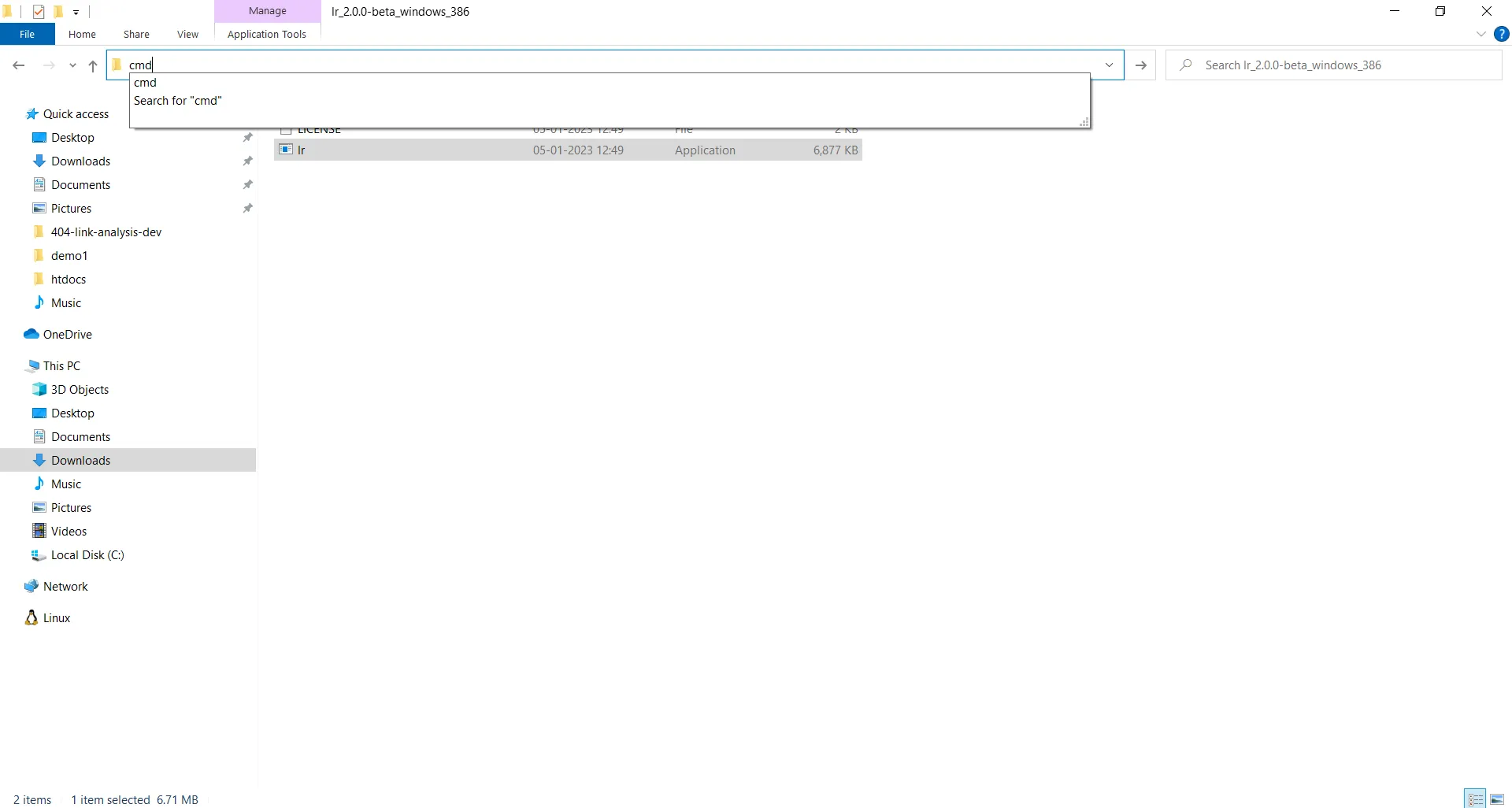
3. Next, the following terminal will open where you can run the lr CLI commands:
Installation from source
-
Verify that you have Go 1.16+ installed:
$ go versionIf Go is not installed, follow the instructions on the Go website. -
Clone the following repository:
$ git clone https://github.com/LoginRadius/lr-cli.git
$ cd lr-cli- Build and install
For Unix:
## installs to '/usr/local' by default; sudo may be required
$ make install
For Windows:
 # build the `bin\gh.exe` binary
> go run script/build.go
There are no installation steps available on Windows.
4. Run lr --help to check if it worked.
On Windows
Run bin\lr --help to check if it worked.Commands
Authentication
Run lr login to authenticate. The authentication process uses a web-based browser flow.
Options
lr [flags]

  add:         add command
  delete:      delete command
  demo:        Opens LoginRadius Identity Experience Framework (IDX) of your application
  get:         get command
  help:        Help about any command
  login:       Login to LR account
  logout:      Logout of LR account
  reset-secret: Resets the User App`s API secret
  set:         set command
  verify:      Verify Email/Password

  --help      Show help for command
  --version   Show lr version

  Use 'lr <command> <subcommand> --help' for more information about a command.
lr login
Use this command to log in to your LoginRadius account. The authentication process uses a web-based browser flow.
Syntax
lr login [flags]
Examples
## Opens Interactive Mode
$ lr login
? Successfully Authenticated, Fetching Your Site(s)...
? Current Site is: <current-site>, Want to Switch? (Y/n)
? Select the site from the list:
> site1
...
...
siteN
Site has been updated.
Successfully Logged In
Options inherited from parent commands
--help Show help for commandlr logout
Use this command to log out from your LoginRadius account.
Syntax
lr logout [flags]Options inherited from parent commands
--help Show help for commandlr demo
Use this command to open the LoginRadius Identity Experience Framework (IDX) for your app in the browser.
Syntax
lr demo [flags]Examples
## Opens LoginRadius Identity Experience Framework (IDX) in browser
$ lr demo
Options inherited from parent commands
--help Show help for commandlr reset-secret
Use this command to reset your API Secret.
Syntax
lr reset-secret [flags]Examples
$ lr reset-secret
API Secret reset successfully
Options inherited from parent commands
--help Show help for commandlr verify
Use this command to verify that an email exists in your application.
Syntax
lr verify [flags]Examples
$ lr verify -e <email>Options
-e, --email string Enter email idOptions inherited from parent commands
--help Show help for commandGet
lr get config
Use this command to get the API key and secret of your current application.
Syntax
lr get config [flags]Examples
$ lr get config
APP Name: <Your App Name>
API Key: <Your API Key>
API Secret: <Your API secret >
Options inherited from parent commands
--help Show help for commandlr get domain
Use this command to get the list of the whitelisted domains.
Syntax
lr get domain [flags]Examples
$ lr get domain
1. http://localhost
...
Options inherited from parent commands
--help Show help for commandlr get server-info
Use this command to get the basic server information to use when creating the SOTT.
Syntax
lr get server-info [flags]Examples
$ lr get server-info
Server Information:
...

$ lr get server-info --sott=<optional value> (Default=10)
Server Information:
...
Sott:
...
Options
-s, --sott string[="10"] Time diff (default "0")Options inherited from parent commands
--help Show help for commandlr get theme
Use this command to get the active theme (--active) of the Identity Experience Framework (IDX) or to get the list of all available themes (--all).
Syntax
lr get theme [flags]Examples
$ lr get theme --all
Available Themes:
1. Template_1
2. Template_2
3. Template_3
4. Template_4
5. Template_5

$ lr get theme --active
Current Theme: Template_1
Options
--active   Shows current theme
      --all      Lists all available themes
Options inherited from parent commands
--help Show help for commandlr get social
Use this command to get the list of configured social login providers for your application.
Syntax
lr get social [flags]Examples
$ lr get social
+-----------+--------------------+---------+
| PROVIDER  |       SCOPE        | ENABLED |
+-----------+--------------------+---------+
| Linkedin  | r_emailaddress     | true    |
|           |  r_fullprofile     |         |
|           | r_contactinfo      |         |
+-----------+--------------------+---------+
| Yahoo     | N/A                | true    |
+-----------+--------------------+---------+
Options inherited from parent commands
--help Show help for commandlr get site
Use this command to get the information about the:
- Current site/app (--active)
- All sites/app (--all)
- Specific site based on the appid (--appid)
Syntax
lr get site [flags]Examples
$ lr get site --all
All sites:
+--------+-----------------+-------------------------+-----------------+
|   ID   |      NAME       |         DOMAIN          |      ROLES      |
+--------+-----------------+-------------------------+-----------------+
| 111111 | new-test1       | https://test1.io        |     Owner       |
| 122222 | my-app-final    | loginradius.com         |     Admin       |
| 142670 | trail-pro       | https://loginradius.com |     Marketing   |

$ lr get site --active
Current site:
....shell

$ lr get site --appid <appid>
....
Options
--active      Shows active site
      --all         Lists all sites
  -i, --appid int   Filters sites based on ID (default -1)
Options inherited from parent commands
--help Show help for commandlr get sott
Use this command to fetch the list of Sott's configured to your app.
Syntax
lr get sott [flags]Examples
$ lr get sott
+--------------------+-------------+--------------------------+---------------+
| AUTHENTICITY TOKEN | TECHNOLOGY  | DATE RANGE               | COMMENT       |
+--------------------+-------------+--------------------------+---------------+
| <value>            | android     | 2021/8/3 0:0:0 - 2022/8/3| test          |
|                    |             |  0:0:0                   |               |
+--------------------+-------------+--------------------------+---------------+
Options inherited from parent commands
--help Show help for commandlr get hooks
Use this command to get the details of webhooks configured for your app.
Syntax
lr get hooks [flags]Examples
$ lr get hooks
+----------------+----------+----------+--------------------+
|     ID         | NAME     | EVENT    | TARGETURL          |
+----------------+----------+----------+--------------------+
| <value>        | devhook  | register | https://google.com |
+----------------+----------+----------+--------------------+
Options inherited from parent commands
--help Show help for commandlr get schema
Use this command to get the list of configured registration schema fields.
Syntax
lr get schema [flags]Examples
$ lr get schema
+-----------+---------------+----------+---------+
|   NAME    |    DISPLAY    |   TYPE   | ENABLED |
+-----------+---------------+----------+---------+
| password  | Password      | password | true    |
| emailid   | Email Id      | email    | true    |
| lastname  | Last Name     | string   | false   |
| birthdate | Date of Birth | string   | false   |
| country   | Country       | string   | false   |
| firstname | First Name    | string   | false   |
+-----------+---------------+----------+---------+
+-------------------+-----------------------+---------+--------+
| CUSTOM FIELD NAME | CUSTOM FIELD DISPLAY  | TYPE   | ENABLED |
+-------------------+-----------------------+---------+--------+
| cf_MyCF           | MyCF                  | string | false   |
+-------------------+-----------------------+---------+--------+
Options inherited from parent commands
--help Show help for commandlr get login-method
Use this command to get the list of login methods (excluding social login providers) with their status.
Syntax
lr get login-method [flags]Examples
$ lr get login-method
+--------------------+---------------+
|   Method             |  Enabled      |
+--------------------+---------------+
| Phone Login        | true          |
| Passwordless Login | false         |
+--------------------+---------------+
Options inherited from parent commands
--help Show help for commandlr get account
Use this command to get basic account information for a user account using email.
Syntax
lr get account [flags]Examples
$ lr get account --email <email>
First name: <firstname>
Email: <email>
Uid: <uid>
ID: <id>
Options
-e, --email string Enter email id of the userOptions inherited from parent commands
--help Show help for commandlr get profile
Use this command to get basic user profile information by using an email or UID.
Syntax
lr get profile [flags]Examples
$ lr get profile --email <email> (or) --uid <uid>
First name: <firstname>
Email: <email>
Uid: <uid>
ID: <id>
Options
-e, --email string   Enter email id of the user
  -u, --uid string     Enter UID of the user
Options inherited from parent commands
--help Show help for commandlr get smtp-configuration
Use this command to get your SMTP email setting Configuration
Syntax
lr get smtp-configuration [flags]Examples
$ lr get smtp-configuration
SMTP Providers: SendGrid
Key: <Key>
Secret: <Secret>
From Name: <Name>
From Email Id: <Email ID>
Options inherited from parent commands
--help Show help for commandlr get access-restriction
Use this command to get Whitelisted/Blacklisted Domains/Emails and Allowed/Denied IP/IP Range.
Syntax
lr get access-restriction [flags]Examples
$ lr get access-restriction --domain
WhiteList/Blacklist Domains/Emails
1. http://localhost
...
...

$ lr get access-restriction --ip
Allowed/Denied IP or IP Range
1. 12.3.4.5
...
...
Options
--domain   Get the list of domain/Email
--ip        Gets the list of IP or IP Range
Options inherited from parent commands
--help Show help for commandAdd
lr add domain
Use this command to whitelist a domain.
Syntax
lr add domain [flags]Examples
$ lr add domain --domain <domain>
Your Domain  <newDomain>  is now whitelisted
Options
-d, --domain string Enter Domain Value that you want to addOptions inherited from parent commands
--help Show help for commandlr add social
Use this command to select and configure a social login provider for your application.
Syntax
lr add social [flags]Examples
$ lr add social
        ? Select the provider from the list: Facebook
        Please enter the provider key:
        *******
        Please enter the provider secret:
        *******
        Social Provider added successfully
Options inherited from parent commands
--help Show help for commandlr add sott
Use this command to generate a time-bound SOTT.
Syntax
lr add sott [flags]Examples
$ lr add sott -f <FromDate(mm/dd/yyyy)> -t <ToDate(mm/dd/yyyy)>
Comment(optional): <value>
Select a technology
.....
.....

sott generated successfully
AunthenticityToken: <token>
Comment: <comment>
Sott: <sott>
Technology: <tech>
Options
-f, --FromDate string   From Date of the the SOTT
  -t, --ToDate string     To Date of the SOTT
Options inherited from parent commands
--help Show help for commandlr add custom-field
Use this command to add custom fields to your Identity Experience Framework (IDX).
Syntax
lr add custom-field [flags]Examples
$ lr add custom-field -f MyCustomField
MyCustomField is successfully add as your customfields
You can now add the custom field in your registration schema using "lr set schema" command
Options
-f, --fieldName string The Field Name which you wanted to Display for your custom field.Options inherited from parent commands
--help Show help for commandlr add account
Use this command to add a user to your application.
Syntax
lr add account [flags]Examples
$ lr add account --name <name> --email <email>
User Account  successfully created
First name:  <first name>
Email: <email>
Uid:  <uid>
ID:  <id>
Options
-e, --email string   Email id of the user you want to add
  -n, --name string    First name of the user
Options inherited from parent commands
--help Show help for commandlr add hooks
Use this command to select a webhook event and then configure a URL to receive the payload.
Syntax
lr add hooks [flags]Examples
$ lr add hooks
Enter Name: <hook-name>
? Select a plan  [Use arrows to move, type to filter]
> Login
Register
ResetPassword
UpdateProfile
Enter TargetUrl: <url>
Webhook has been added.
Options inherited from parent commands
--help Show help for commandlr add smtp-configuration
Configure your SMTP email settings to allow LoginRadius to send email from your email server automatically.
Syntax
lr add smtp-configuration [flags]Examples
$ lr add smtp-configurationSMTP Providers: SendGrid If you don't have a sendgrid account. Please Create a sendgrid account via https://app.sendgrid.com/
? Key: <Key>
? Secret: <Secret>
? From Name: <Name>
? From Email Id: <Email ID>
SMTP settings are saved
? Send an email to verify your configuration settings are correct (Y/N): Yes
? To Email: <Email ID for Verification>
SMTP settings are verified
Options inherited from parent commands
--help Show help for commandlr add access-restriction
Use this command to add access restrictions for Domain/Email or IP/IP Range.
Syntax
lr add access-restriction [flags]Examples
(For Domain)
$ lr add access-restriction --whitelist-domain <domain>
? Adding Domain/Email to Whitelist will result in the deletion of all     Blacklist Domains/Emails. Are you sure you want to proceed?(Y/N):Yes
Whitelist Domain/Email have been updated successfully.

(For IP/IP Range)
$ lr add access-restriction --allowed-ip <ip/ip range>
Denied IP or IP range configuration exists. Adding IP or IP range to the Allowed list will remove the existing denied IP or IP range. Are you sure you want to proceed?:Yes
IP authorization settings are saved successfully.
Options
  -a, --allowed-ip string         Enter Allowed IP or IP Range Value you want to add
  -b, --blacklist-domain string   Enter Blacklist Domain/Email Value you want to add
  -d, --denied-ip string          Enter Denied IP or IP Range Value you want to add
  -w, --whitelist-domain string   Enter Whitelist Domain/Email Value you want to add
Options inherited from parent commands
--help Show help for commandSet
lr set domain
Use this command to update the whitelisted domains.
Syntax
lr set domain [flags]Examples
$ lr set domain --domain <domain> --new-domain <new domain>
Domain successfully updated
Options
-d, --domain string       Enter Old Domain Value
  -n, --new-domain string   Enter New Domain Value
Options inherited from parent commands
--help Show help for commandlr set social
Use this command to update the configured social login provider.
Syntax
lr set social [flags]Examples
$ lr set social -p Google
? API Key: <key>
? API Secret: <secret>
Google updated successfully.

$ lr set social -p Google --disable
Google Disabled Successfully

$ lr set social -p Google --enable
Google Enabled Successfully
Options
-d, --disable           This Flag is used to enable to field with the default configuration
  -e, --enable            This Flag is used to enable to field with the default configuration
  -p, --provider string   The provider name which you want to update.
Options inherited from parent commands
--help Show help for commandlr set theme
Use this command to change the theme of your Identity Experience Framework (IDX).
Syntax
lr set theme [flags]Examples
$ lr set theme --theme <theme>
Previous changes will be lost. Do you wish to continue?
(Y)
.......
.......

Your theme has been changed
Options
-t, --theme string Changes the themeOptions inherited from parent commands
--help Show help for commandlr set schema
Use this command to enable or disable the registration fields for the Identity Experience Framework (IDX). You can also manage field configurations such as optional, required, type, and name.
Syntax
lr set schema [flags]Examples
## To update the field configuration
$ lr set schema -f my-field
? Enter Field Name: My Field
? Optional? Yes
? Select field Type CheckBox

## To Enable the field with default configuration
lr set schema -f my-field --enable
      "my-field" enabled successfully

## To Disable the field
lr set schema -f my-field --disable
      "my-field" disabled successfully
Options
-d, --disable            This Flag is used to enable to field with the default configuration
  -e, --enable             This Flag is used to enable to field with the default configuration
  -f, --fieldName string   The Field Name which you wanted to enable or update.
Options inherited from parent commands
--help Show help for commandlr set smtp-configuration
Use this command to update the configured SMTP email setting
Syntax
lr set smtp-configuration [flags]Examples
## SMTP Provider's Names we can use in set commands
## AmazonSES-USEast, AmazonSES-USWest, AmazonSES-EU, Gmail,
Mandrill, Rackspace-mailgun, SendGrid, Yahoo, Other
$ lr set smtp-configuration -p SendGrid
? Key: <Key>
? Secret: <Secret>
? From Name: <Name>
? From Email Id: <Email ID>
SMTP settings updated

? Send an email to verify your configuration settings are correct?(Y/N): Yes
? To Email : <Email ID for Verification>
SMTP settings are verified
Options
-p, --provider string Enter the provider name which you want to update.Options inherited from parent commands
--help Show help for commandlr set access-restriction
Use this command to update Access Restriction for Domain/Email and IP/IP Range.
Syntax
lr set access-restriction [flags]Examples
(For Domain/Email)
$ lr set access-restriction --blacklist-domain <old-domain> --new-domain <new-domain>
Domains/Emails have been updated successfully

(For IP or IP Range)
$ lr set access-restriction --denied-ip <old-ip/ip range> --new-ip <new-ip>
IP authorization settings are saved successfully
Options
  -a, --allowed-ip string         Enter Allowed IP or IP Range Value
  -b, --blacklist-domain string   Enter Old Blacklist Domain/Email Value
  -d, --denied-ip string          Enter Denied IP or IP Range Value
  -n, --new-domain string         Enter New Domain/Email Value
  -i, --new-ip string             Enter New IP or IP Range Value
  -w, --whitelist-domain string   Enter Old Whitelist Domain/Email Value
Options inherited from parent commands
--help Show help for commandDelete
lr delete domain
Use this command to remove the whitelisted domain from your app.
Syntax
lr delete domain [flags]Examples
$ lr delete domain --domain <domain>
<domain> is now removed from whitelisted domain."
Options
-d, --domain string Enter Domain Value of the domain you want to deleteOptions inherited from parent commands
--help Show help for commandlr delete social
Use this command to delete a configured social login provider from your application.
Syntax
lr delete social [flags]Examples
$ lr delete social -p Google
? Are you Sure you want to delete the provider? Yes
Google Successfully Deleted
Options
-p, --provider string Enter name of the provider you want to deleteOptions inherited from parent commands
--help Show help for commandlr delete account
Use this command to delete a user from your app.
Syntax
lr delete account [flags]Examples
$ lr delete account --email <email> (or) --uid <uid>
User account successfully deleted
Options
-e, --email string   Email id of the user you want to delete
  -u, --uid string     UID of the user you want to delete
Options inherited from parent commands
--help Show help for commandlr delete hooks
Use this command to delete a configured webhook.
Syntax
lr delete hooks [flags]Examples
$ lr delete hooks --hookid <hookid>
Are you sure you want to proceed ?
(Y)

Webhook has been deleted.
Options
-i, --hookid string Enter hook unique id of the hook you want to deleteOptions inherited from parent commands
--help Show help for commandlr delete sottUse this command to delete a single or all SOTTs configured to your app.
Syntax
lr delete sott [flags]Examples
$ lr delete sott --token <value>  //Pass Authenticity token of SOTT to be deleted as value.

SOTT deleted successfully.

$ lr delete sott --all           //Deletes all SOTTs

All SOTTs for your app have been deleted successfully.
Options
--all            Deletes all SOTT
  -t, --token string   Enter Authenticity Token of SOTT that you want to delete
Options inherited from parent commands
--help Show help for commandlr delete custom-field
Use this command to delete a custom field from your Identity Experience Framework (IDX).
Syntax
lr delete custom-field [flags]####Examples
$ lr delete custom-field
? Select the field you Want to delete from the list: MyCF
? Are you Sure you want to delete this custom field? Yes
The field has been successfully deleted
####Options inherited from parent commands
--help Show help for commandlr delete smtp-configuration
Use this command to remove/reset the configured SMTP email setting.
####Syntax
lr delete smtp-configuration [flags]####Examples
$ lr delete smtp-configuration
Settings have been reset successfully
####Options inherited from parent commands
--help Show help for commandlr delete access-restriction
Use this command to delete access restrictions for Domain/Email or IP/IP Range.
Syntax
lr delete access-restriction [flags]Examples
(For Domain/Email)
$ lr delete access-restriction --blacklist-domain <domain>
Domains/Emails have been updated successfully

(For IP or IP Range)
$ lr delete access-restriction --denied-ip <ip>
IP authorization settings are saved successfully.
Options
      --all-domain                Delete all domain (It disables the Domain/Email access restriction)
      --all-ip                    Deletes all IP or IP Range (It also disables all IP /IP Range access restriction)
  -a, --allowed-ip string         Enter Allowed IP or IP Range Value you want to delete
  -b, --blacklist-domain string   Enter Blacklist Domain/Email Value you want to delete
  -d, --denied-ip string          Enter Denied IP or IP Range Value you want to delete
  -w, --whitelist-domain string   Enter Whitelist Domain/Email Value you want to delete
Options inherited from parent commands
--help Show help for commandVerify
lr verify resend
Use this command to resend the verification email to the email id entered.
Syntax
lr verify resend [flags]Options
-e, --email string Enter email idOptions inherited from parent commands
--help Show help for commandContributing
We invite you to contribute to the LoginRadius CLI! To get started, please review our Guidelines for Contributing. Everyone participating in the LoginRadius CLI codebases, issue trackers, chat rooms, and mailing lists is expected to adhere to the LoginRadius code of conduct.
License
For more information on licensing, please refer to License.
Feedback
Thank you for checking out LoginRadius CLI! Please open an issue to send us feedback. We're looking forward to hearing about it.